
Video Editors have become part of our lives not only for aspiring film professionals but also for the great many public who have donned the Internet Era with Youtube videos captured with their personal video cams. Capturing those moments is one thing, but actually editing the small movies of our lives we captured are an expensive proposition. Commercial Video Editors costs an rm and a leg and every year somebody comes out better than the one that came before it.
Fortunately for us there are free video editors out there that not only are capable of equalizing our home movie productions in par with the likes of Adobe Premiere and Sony Vegas, but at time it actually goes beyond the capabilities of these commercial products.
Here are the top 10 for the budget conscious cinematographer.
1. Windows Movie Maker - is a basic video creating/editing software included in Microsoft Windows. It contains features such as effects, transitions, titles/credits, audio track, timeline narration, and Auto Movie. New effects and transitions can be made and existing ones can be modified using XML code. Windows Movie Maker is also a basic audio track editing program. It can apply basic effects to audio tracks such as fade in or fade out. The audio tracks can then be exported in the form of a sound file instead of a video file. it is bundled with Window's Operating Systems.
2. Pinnacle Videospin - Though it doesn't match the sophistication of paid-for applications, it does let you perform basic edits and output movies for use online or--if you're willing to sacrifice the cost of a cheap lunch--on your iPod or on a DVD. VideoSpin has some strict limitations. You can't import from DV camcorders, since the application works only with files on your hard drive. You can't edit audio, except for levels. And since the software has no video effects, you can't brighten dark movies. Unless you purchase add-ons, you can export only to AVI, Flash, Real, or MPEG-1 format; you can't exchange files with Studio, either. And the interface size is fixed, so you can't view it full-screen.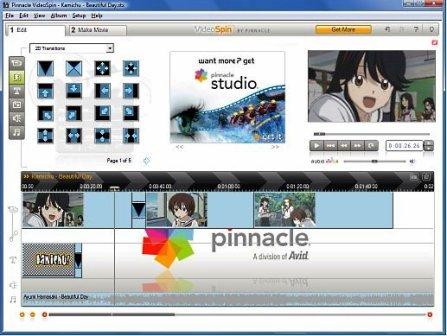
3. iMovie - Windows Media Player's counterpart for the Mac User. iMovie imports video footage to the Mac using either the FireWire interface on most MiniDV format digital video cameras, the USB port, or by importing the files from a hard drive. From there, the user can edit the video clips, add titles, and add music. Effects include basic color correction and video enhancement tools, and transitions such as fade-in, fade-out, and slides.
4. zs4 Video Editor - has more than 150 built-in video effects including excellent color and chroma keying. Other features include custom output video width and height, unlimited tracks and sub-composites, custom speed and direction change for video and audio, and the ability to slave effect and compositing controls to audio wave forms.
5. Avidemux - has often been considered to be an open-source substitute for high-end commercial editors, such as Adobe Premiere Pro, although it does not have as many features. Avidemux's numerous features and functions are comparable to VirtualDub. Avidemux can do things that its Windows-only counterpart cannot. It supports OGM, MP4 and Matroska files natively, direct read input for various types of MPEG files, and many other video formats and containers. It offers MPEG editing and has built-in subtitle handling.
6. VirtualDub - has digital and analog capture capabilities. It supports both DirectShow & Video for Windows capture. Capture features include capture to any AVI variant, audio VU meters, overlay and preview modes, histogram, selectable crop area, video noise reduction, auto stop settings (based on capture time, file size, free space, and/or dropped frames), and designate alternate drive(s) for capture overflow.
7. LiVES - allows the user to manipulate video in realtime and in non-realtime. The application also has features which go beyond traditional video editing applications - for example, it can be controlled and monitored remotely over a network, and it has facilities for streaming to and from another copy of LiVES. LiVES uses a system of plugins for effects, decoders, encoders and video playback.
8. Kdenlive - supports all of the formats supported by FFmpeg (such as QuickTime, AVI, WMV, MPEG, and Flash Video), and also supports 4:3 and 16:9 aspect ratios for both PAL, NTSC and various HD standards, including HDV. Video can also be exported to DV devices, or written to a DVD with chapters and a simple menu. Audio effects include normalization, phase and pitch shifting, limiting, volume adjustment, reverb and equalization filters amongst others. Video effects include options for masking, blue-screen, distortions, rotations, colour tools, blurring, obscuring and others.
9. Blender is a very robust and widely used open source application for 3D modeling and animation. A perhaps not so well known feature of blender is its ability to edit video and audio, thanks to its sequence editor. In fact, it is a full blown non-linear editing module, which allows to apply numerous effects, as well as doing simple tasks as blending clips together, adding transitions to name a few.
10. Cinelerra - support for very high-fidelity audio and video: it processes audio using 64 bits of precision and it is resolution and frame rate-independent, meaning that it can support video of any speed and size. It includes many of the features of the pricey professional editors and some extras: real-time visual effects, FireWire input/output, render-farm capability, and even support for HDTV formats and Ogg Vorbis. The downside is that its hardware demands are quite unforgiving.

Subscribe


blog comments powered by Disqus
Subscribe to:
Post Comments (Atom)
